Best Peripherals in 2026: Top 10 Picks Ranked
The ASUS VG27AQ1A leads our 2026 peripherals ranking with its 170Hz 1440p IPS panel at $229, offering the best balance of gaming performance and visual quality across any budget.
S
Spektova Editorial
The ASUS VG27AQ1A leads our 2026 peripherals ranking with its 170Hz 1440p IPS panel at $229, offering the best balance of gaming performance and visual quality across any budget.
The best peripheral in 2026 is the Logitech G PRO X SUPERLIGHT for competitive gaming mice, but across all categories, the ASUS VG27AQ1A stands out as the single most versatile upgrade for any setup. Whether you're building a pro esports rig, a streaming studio, or a productivity workstation, the products below represent the sharpest value and highest performance available right now.
At $229, the ASUS VG27AQ1A delivers a 170Hz IPS panel at WQHD 2560×1440 resolution with a 1ms response time — a combination that hits the sweet spot between visual fidelity and competitive performance. The 27-inch screen size at 1440p produces a pixel density of approximately 108 PPI, noticeably sharper than 1080p monitors in the same size class. ASUS's Extreme Low Motion Blur (ELMB) technology actively eliminates ghosting, making fast-paced titles like Valorant and CS2 look exceptionally clean. The IPS panel also brings wide viewing angles and accurate color reproduction (covering 99% of sRGB), making it equally capable for content creation and media consumption. While 240Hz monitors exist at higher price points, the 170Hz ceiling here is more than sufficient for the vast majority of competitive players. Best for: Gamers and creators who want one monitor to do everything well.
The G PRO X SUPERLIGHT ($147) is the mouse that professional esports athletes have trusted on LAN stages worldwide. At just 60g with a symmetrical shape and 5 programmable buttons, it prioritizes speed and precision over feature bloat. The 44K DPI HERO sensor with an 8kHz polling rate delivers sub-millisecond input latency that is genuinely indistinguishable from wired in competitive play. The 95-hour battery life is class-leading for a wireless mouse at this weight, and USB-C fast charging means a 15-minute charge gives you hours of use. PowerPlay wireless charging compatibility is a premium bonus for those already invested in the Logitech ecosystem. Its only real limitation is the 5-button layout, which won't satisfy MMO or MOBA players who need macro keys. Best for: FPS and battle royale players who prioritize weight and precision above all else.
At $129 and 54g, the Razer Viper V3 Pro shaves another 6 grams off the G PRO X SUPERLIGHT while adding ambidextrous ergonomics and a 35K DPI Focus Pro sensor with 8K polling. The third-generation optical switches actuate at the speed of light — literally — eliminating the debounce delay found in mechanical alternatives. For left-handed players, this is the top wireless option on the market. The 8-button layout offers slightly more customization than the Logitech, though neither competes with multi-button side-button mice. At $18 less than the SUPERLIGHT, it's also the better value for players who want cutting-edge specs without paying a brand premium. Best for: Left-handed players and right-handed gamers who want maximum sensor performance at a slight discount.
The SteelSeries Apex Pro TKL ($179) is the keyboard for serious competitive players. Its OmniPoint 3.0 hypermagnetic (Hall effect) switches are the key differentiator: adjustable actuation from 0.1mm to 4.0mm means you can tune the keyboard to your exact finger pressure, and Rapid Trigger technology resets the key the instant you release it rather than waiting for a fixed reset point. In games like CS2 and Apex Legends, this translates to measurably faster counter-strafing and movement. Hall effect technology also means zero wear on the switches — they won't develop wobble or inconsistency over millions of keystrokes. The TKL form factor keeps your mouse hand closer to center, reducing shoulder strain during long sessions. The premium price is justified only if you play at a competitive level where milliseconds matter. Best for: Competitive FPS and battle royale players who want every mechanical advantage possible.
At $57, the Royal Kludge RK84 is the most affordable path to a genuinely premium typing and gaming experience. The 75% layout fits 84 keys into a compact footprint while retaining dedicated arrow keys and function row — a smarter layout than 65% boards that sacrifice too much. Triple connectivity (Bluetooth 5.0, 2.4GHz RF dongle, and USB-C) means it works seamlessly across PC, Mac, tablet, and smartphone. Hot-swap switch sockets let you replace switches without soldering, a feature usually reserved for $150+ custom boards. The high-capacity battery supports weeks of wireless use. Build quality doesn't match SteelSeries or Keychron at this price, and firmware updates can be slow, but for everyday typing and casual gaming, the RK84 punches well above its weight class. Best for: Budget-conscious users, students, and anyone wanting a wireless mechanical keyboard without spending $150+.
The LG 34GP83A-B ($391) is the definitive workstation monitor for anyone who spends as much time in spreadsheets and video timelines as in games. The 34-inch 21:9 IPS panel at 3440×1440 resolution replaces a dual-monitor setup with a single seamless display, eliminating the bezel gap that breaks focus. USB-C with 96W Power Delivery charges a laptop while transmitting video and data through a single cable — a setup that genuinely reduces desk clutter. HDR10 support adds depth to color grading and media playback. The 100Hz refresh rate is adequate for gaming but trails behind the 144Hz+ standard, making this a secondary consideration for competitive players. The ultrawide format also requires game-by-game compatibility checks, as some titles still don't support 21:9 natively. Best for: Content creators, developers, and hybrid workers who need maximum screen real estate in one panel.
The AOC 24G2SP ($120) delivers 180Hz at 1080p with a 0.5ms MPRT response time — specifications that were mid-range just two years ago and are now available at entry-level pricing. The 1500R curved VA panel provides deeper contrast ratios than IPS at this price point, making dark scenes in horror and action games look dramatically better. For players on a tight budget who prioritize frame rate over resolution, this is the most competitive option available under $130. The 1080p resolution is a real limitation on a 24-inch panel compared to 1440p alternatives, and the glossy surface can cause reflections in bright rooms. But if your GPU is a GTX 1660 or RX 6600, 1080p at 180Hz is exactly where you want to be. Best for: Budget gamers with mid-range GPUs who prioritize high frame rates over resolution.
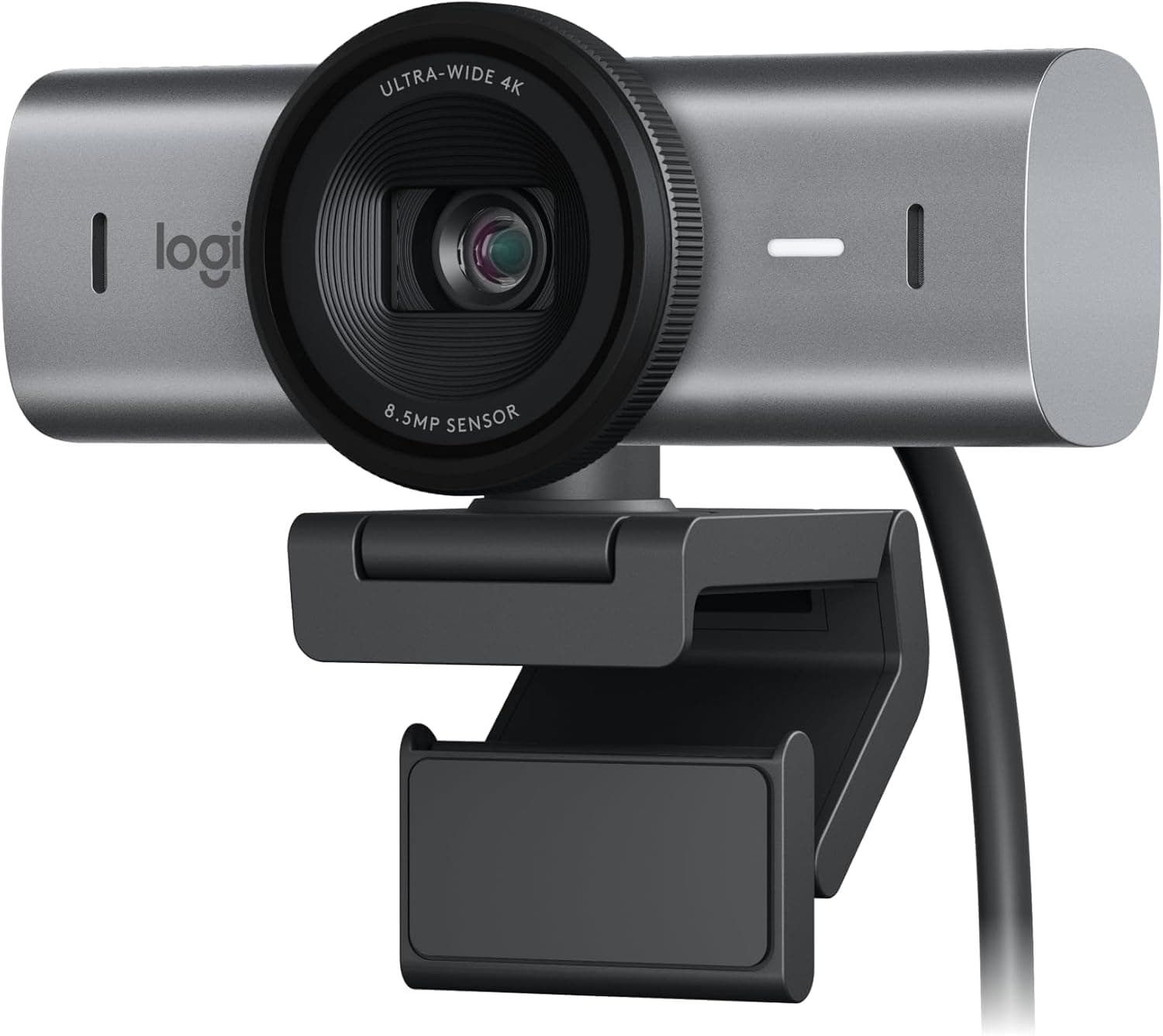
The Logitech Brio 4K ($198) sets the benchmark for professional webcam quality. Its CMOS sensor with 70% larger pixels than standard webcams captures significantly more light per pixel, producing cleaner images in dim office environments without the grainy noise that plagues budget cameras. The 4K/30fps or 1080p/60fps flexibility covers both high-resolution video calls and smooth streaming scenarios. The f/1.0 aperture spec (if accurate) would be exceptional for background separation and low-light performance. Nintendo Switch 2 GameChat compatibility is a niche but useful feature for console streamers. The main caveat is bandwidth: 4K streaming requires a strong upload connection and a capable CPU for encoding. Best for: Remote professionals, content creators, and streamers who need broadcast-quality video from a desktop webcam.
The Razer Kiyo Pro Ultra ($198) matches the Brio 4K on price and core resolution specs but is purpose-built for streaming workflows. The 4K/30fps and 1080p/60fps modes serve the same use cases, and the 70% larger pixel sensor similarly improves low-light performance. Nintendo Switch 2 GameChat compatibility gives it a unique edge for console-focused streamers. It ranks below the Brio 4K primarily due to the absence of confirmed autofocus specs and less established long-term reliability data compared to Logitech's track record. For Razer ecosystem users or streamers specifically targeting Switch 2 content, it's an equally valid choice. Best for: Razer ecosystem users and Nintendo Switch 2 streamers who want 4K capture quality.
At just $27, the Logitech G305 Lightspeed is the most remarkable value in this entire list. The HERO 12K DPI sensor is the same optical technology found in mice three to four times the price, and LIGHTSPEED wireless delivers a 1ms response time that is genuinely competitive with wired alternatives. The lightweight design reduces fatigue during long sessions. The single AA battery is the main operational drawback — heavy users may go through batteries monthly — but the tradeoff is a simpler, lighter chassis. For players who want wireless gaming performance without spending over $30, there is no better option. Best for: Budget-conscious gamers, students, and anyone entering PC gaming who needs reliable wireless performance.
Each product was evaluated across four criteria: performance specifications relative to price tier, real-world use case suitability, build quality and reliability indicators, and competitive positioning against category alternatives. Gaming mice were assessed on sensor accuracy, weight, wireless latency, and battery performance. Keyboards were evaluated on switch technology, layout efficiency, and connectivity options. Monitors were scored on resolution, refresh rate, response time, and panel technology trade-offs. Webcams were judged on sensor quality, resolution flexibility, and streaming compatibility. Scores reflect value within each product's price tier rather than absolute performance alone.
The ASUS VG27AQ1A at $229 is the best gaming monitor under $250 in 2026. It offers a 170Hz IPS panel at 2560×1440 resolution with 1ms response time, covering both competitive gaming and content creation in a single display.
Yes, the Logitech G PRO X SUPERLIGHT is worth $147 for competitive FPS players. Its 60g weight, 8kHz polling rate, 44K DPI HERO sensor, and 95-hour battery life are specifications that professional esports athletes use on LAN stages. Budget players should consider the Logitech G305 at $27 instead.
The SteelSeries Apex Pro TKL ($179) is the best mechanical keyboard for competitive gaming in 2026 due to its OmniPoint 3.0 Hall effect switches with Rapid Trigger technology. For budget users, the Royal Kludge RK84 at $57 offers hot-swap switches and triple wireless connectivity at a fraction of the price.
Not necessarily. 4K webcams like the Logitech Brio 4K and Razer Kiyo Pro Ultra (both $198) deliver superior image quality, but 4K streaming requires significant upload bandwidth and CPU encoding power. Most streaming platforms cap output at 1080p/60fps anyway, meaning the primary benefit of 4K webcams is the larger sensor for better low-light performance rather than the raw resolution.
Upgrade your monitor first. A 1440p 170Hz display like the ASUS VG27AQ1A ($229) produces a more immediate and noticeable improvement to your daily experience than any single mouse or keyboard upgrade. Once your display is sorted, a high-quality wireless mouse like the Logitech G305 ($27) or G PRO X SUPERLIGHT ($147) is the next highest-impact investment.
Get the best deals and reviews in your inbox.
We respect your privacy. Unsubscribe anytime.